- Blog
- >
- Fall Prep, Part 3: Where Client Demand and Team Availability Finally Meet
Last updated: August 12, 2026
Fall Prep, Part 3: Where Client Demand and Team Availability Finally Meet
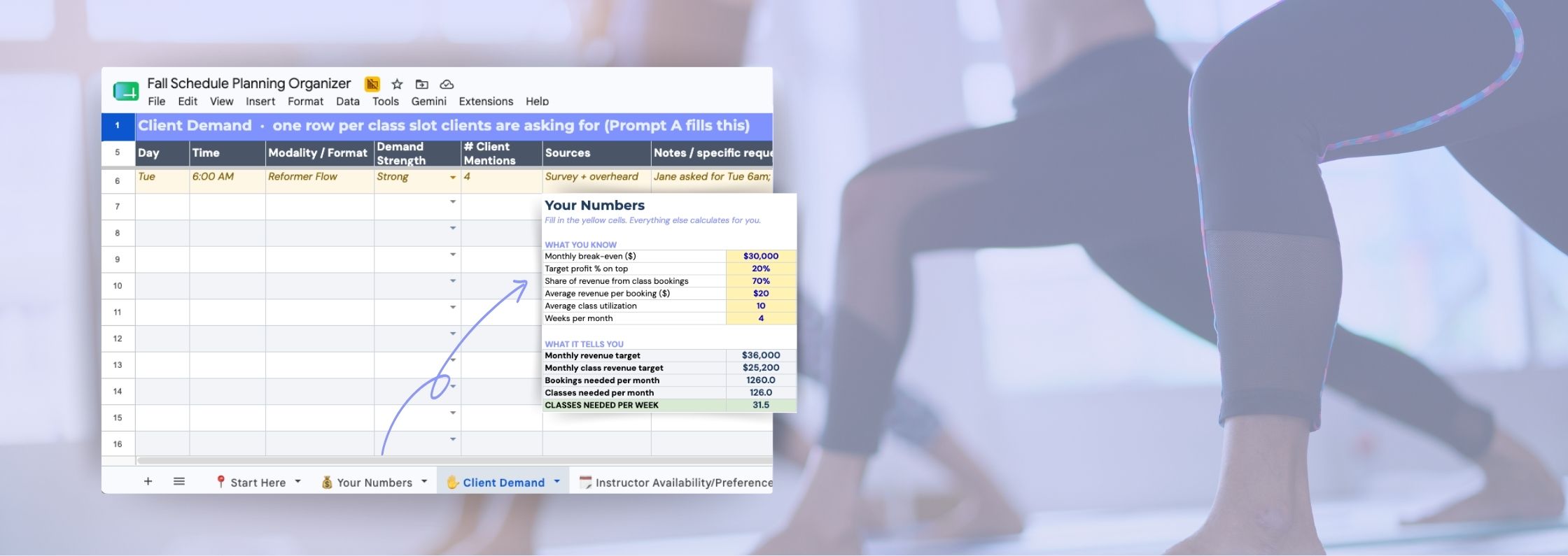
You've heard from your clients and your team. Now building the schedule is where you stop collecting and start leading.
If you completed the first two steps from our Fall Prep series, you’re holding both sides of the schedule for the first time: what your clients want, and what your team can give. (Need to catch up? Here’s part 1 and part 2.) Steps one and two were listening. This step is deciding and putting on your strategic hat, and there’s no form that does it for you. That’s the point. It takes judgment, and it’s the part only you can do.
Two mindsets to bring to the table first.
Input is data, not a mandate. You spent three weeks asking what clients and staff wanted, but asking was never a promise. A survey response is a data point. An instructor’s dream shift is a data point. Your job is to weigh them against each other and against your business, then decide. Hold the input seriously and keep the final call yours.
Build for the business and the people at once. That means balancing client demand with keeping your team engaged, and keeping an eye on the bottom line: your projected revenue. Lean too far toward demand and you risk burning your team out by October. Lean too far toward preferences and you build a schedule everyone loves to teach but that quietly erodes your utilization, and a seemingly full week can still fail to drive the revenue you need. It’s a lot to hold at once, but awareness is the hardest part, so we’ll walk you through each piece.
📥 Grab the free Fall Schedule Organizer
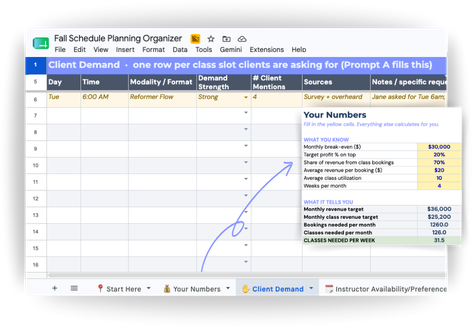
This article walks through the thinking; the Organizer does the heavy lifting. It calculates your target classes per week, gives you the exact AI prompts to synthesize your client demand and team availability, and gives every decision a home. Download it and build alongside each step below.
Step #1: Know Your Target Class Number Before You Build
Before you schedule a single class, know how many you actually need to run.
Start from your break-even, then add the profit you’re aiming for (at least 20%). Say break-even is $30,000 a month; add 20% and your revenue target is $36,000. Now narrow it to class revenue: if classes tend to make up about 70% of your revenue (not retail or private sessions), that’s roughly $25,000 you need from classes. At $20 a booking (your average price per class across packages and memberships), that’s about 1,250 bookings. If a typical class draws 10 people (your member management system will show this either as an average headcount or as an average utilization rate against your class caps, which are two views of the same number) that’s around 125 classes a month to hit your revenue goals. Divide by four weeks for a normal month, and there’s your number: about 31 classes a week.
Important note: This is a jumping-off point, built off your past utilization and clients-per-class averages. If your average utilization ran under 60%, start with fewer classes than the number above and you’ll set yourself up stronger. If it ran 80% or higher, consider scheduling a few more per week than you calculated.
That’s all the math for now; the per-class targets come later. This weekly number is there to keep you honest and give you a general target. It’s the line that stops you from saying yes to every request and then staring at a calendar you can’t fill. Build past it and you spread the same clients thinner across more classes, and your utilization drops. Better to run 31 classes that feel full than 40 that feel empty, and it’s always easier to add classes later than to cut them once instructors and a few dedicated clients are attached.
⚡Action Step:
The “Your Numbers” tab in the Fall Schedule Organizer (grab it HERE) does this for you. Drop in your figures and it hands you your target classes per week, your north star for everything that follows.
Step #2: Turn Client Demand Into a Clean List with AI
The first step we took in our Fall Prep series was surveying clients, both as an engagement tactic and to help guide your schedule creation. You should now have a mix of structured survey responses and conversational, qualitative requests, and the good news is, you don’t have to do the synthesizing in your head. Gather everything you have from step one, the survey results, the shift notes, and the overheard-in-the-studio channel, and paste it into Claude without cleaning it up first.
Ask it to turn the pile into clean rows that you’ll add into your Organizer, one per class time and format clients are asking for. The magic is in how it can group and source: when Jane asks for a Tuesday 6am and Jill wants a “super early” Tuesday, Claude can fold them into one row, note it’s built from two clients, and tell you where each piece came from. You get a clean list of class requests instead of a hundred scattered comments. The exact prompt (Prompt A) is in the Organizer, and it produces exactly what you need for the “Client Demand” tab.
Step #3: Gain the Same Clarity from Your Team’s Asks
Now you’ll do the same for your team with the information you gathered in Step 2 of the Fall Prep series, but anchor it to the available class slots, not the instructor. Prompt B in the Organizer lays your total availability out class by class adding one column for everyone who’s available, one of anyone who prefers it, and a growth-alignment note for anyone whose development goal it fits. Same shape as your demand table, so the two will line up when needed.
It also starts building your Instructor Notes tab: one row per instructor with their caps and constraints. If Maya said two early mornings a week is her ceiling, it’s logged, so when you build you can catch it before you pencil her in for three 6ams and pay for it in February.
Step #4: Combine Everything Into the Schedule Builder
Now your client feedback and instructor preferences/availability are in the same format. In the “Schedule Builder” tab, each row is one slot with everything you need beside it: demand strength, how many clients asked, and which instructors are available and interested. You’ll work it in a few passes.
First priority: lock in the sure things. Start with the slots where real client demand and an eager, available instructor already line up. Both sides want it, so there’s no guesswork here, this is your backbone. Build these first (mark them Build Now), then see where that leaves you against the target classes per week number you set in step one.
Second priority: connect the dots. Now work the near-matches, the slots with strong demand but no obvious instructor, or an excited, available instructor but no proven demand yet. Each is half of a great class, and your job is to find the other half. Hunt for parallels: a client asked for “something high-energy on the weekend” and an instructor’s growth goal is a new HIIT format? That’s a match hiding in plain sight. An instructor has open Tuesday mornings and a cluster of clients asked if you could “open earlier”? Point that availability at that demand. Work the strongest parallels first, adding them in where you need to close the gap to your class-count goal, or to give the week better variety and shape (more on shape in step five). Mark the ones you slot in 2nd Priority..
Whatever’s left. The near-matches you didn’t need to hit your number, or couldn’t quite complete, don’t force onto V1. Set them aside as candidates for your monthly experiment (the bonus step below), or for next season.
⚡ Bonus Action:
Ask Claude to do the first pass: label every class slot as first-priority locks or second-priority near-matches, and for the near-matches, suggest which client want and instructor want could pair up. It hands you a strong first draft in minutes, and the parallels worth drawing are where your judgment comes back in.
Step #5: Check It Against Your Number & Shape the Week
Compare the draft against your class/revenue target before you get attached to it. The Builder counts your “Build Now” slots and compares them to your target weekly class number automatically. Under target, you’re leaving revenue on the table; well over, you’re spreading the same clients too thin.
Then look at the shape, not just the count (we are focusing on structure now, not assigning to specific instructors yet). Is Wednesday jammed with eight classes while Monday limps along with two? Even distribution protects your team on heavy days and gives clients a reason to come across the week. And build for the habits that drive retention: when someone can count on the same Tuesday and Thursday 6am, or a mirrored Monday and Wednesday, they build a routine around you, and routine turns a drop-in into a regular.
Now the schedule exists, so set a goal per class. Make your average utilization class-specific: a prime 6am might target 90% full, a new midday class 60%. The trick is that those individual goals should still average back to the number you started with, some above, some below, netting out to your baseline, so you’re ambitious where you can be and realistic where you have to be without inflating what the schedule can actually deliver.
Step #6: Assign Instructors & Pressure-Test It Against Who's Reliable
Up to now you’ve built the structure: which classes run when, each with a shortlist of who’s available and interested. The last move is turning those shortlists into an assigned instructor per class. Weigh three things as you do.
- Reliability. Dump your NetGym insights export into Claude and ask it to rank your instructors with a score based on attendance, callouts, and who picks up the open shift when you’re in a bind. Prompt C in the Organizer does exactly this and gives you scores to add into Instructor Notes, so you’re assigning classes based on track record, not a gut feel. Put your most reliable people in your highest-stakes slots.
- Schedule shape. Don’t make three different instructors each come in to teach one class back to back. If a 6am, 7am, and 8am all need filling and one available instructor can cover the block, give it to them. Consolidating an instructor’s classes respects their time and leaves you fewer handoffs to manage, so look across each day and cluster where you can.
- Caps and preferences. Keep the Instructor Notes tab open and honor what’s there. If Maya capped herself at two early mornings, a third will cost you by February. And where you can hand someone a class they told you they’d love, do it, because a preference met is engagement banked.
Make the calls, note the assigned instructor for each class, and your draft is a real schedule.
Bonus: Bake In One Bet a Month
Add an experimentation layer: a workshop or specialty class a month, or a bigger one a quarter, to run as a beta test. This is the home for everything that didn’t earn a weekly slot, the niche modality, the off-peak time, the ask that was interesting but not strong enough to bet an ongoing class on. You test it in a low-stakes way before you ever commit, and some of these become next season’s backbone.
And it does two more things. A workshop opens a revenue stream outside your normal class income. And it’s a safe challenge to give to your team: hand a hungry instructor a specialty class and watch how they step up before you build it into the regular schedule. Set an attendance and revenue goal for each, and let the results tell you what earns a permanent place come winter.
Announce V1 and Own It!
What you built is version one, post it to your team, let them see how their availability, preferences, and goals shaped it, and give them a short, deadlined window to flag any hard conflict that was missed. When people see their fingerprints on the plan, they feel more bought it!
Part of the rollout is owning the calls that didn’t go someone’s way. When you say no, say it with a reason: “I couldn’t give you the Saturday because two others had seniority, but I’ve got you down for the Thursday you asked about, and I want to revisit Saturday in the new year.” People can take a no; what erodes trust is a no with no reasoning behind it. When the window closes, V1 gets locked in!
Anyone can send a survey. Anyone can collect availability. What separates a leader that gathered great intel from one that built a great fall is what happens here: the discipline to build toward a real number, the judgment to weigh both sides, the honesty to own the trade-offs, and the nerve to place one smart bet a month. You did the listening. Now make the calls, and lead your business into the busy season with a schedule you can stand behind.
Want to Build a Fall Schedule Your Whole Team Helped Create?
See how NetGym keeps every conversation, availability request, preference, and insight organized in one place, so the schedule you build this fall is shaped by real demand and backed by a team that’s bought in.